

Effective work order prioritization runs on three things working together: a mandatory priority field captured at submission, a two-factor matrix that maps urgency against impact into four SLA tiers, and automated routing that assigns the right worker without a supervisor manually triaging every ticket. Get those three right and the rest follows. A field service operations platform exists to run this exact system, and operators who build it properly report fewer SLA breaches and faster response to genuinely critical failures.
TL;DR:
- Assigning mandatory priority fields at submission and mapping urgency against impact ensures consistent work order triage and reduces SLA breaches.
- Properly configuring escalation triggers at 60% and 100% of SLA windows can lower breach rates by approximately 70 percent within the first month.
- Routing by skill match and proximity can cut response times by 30 to 40 percent compared to manual dispatching.
- Regular audits of priority coding, lifecycle states, and override actions are essential to maintaining system effectiveness and trust.
- Building a formal, data-driven prioritization system from the start helps prevent common breakdowns like inconsistent coding and untracked SLA breaches.
Table of Contents
- What is work order prioritization and why does severity get confused with it?
- How do scheduling engines score and rank work orders?
- What routing and escalation rules actually cut response times?
- Seven steps to build a prioritisation system that sticks
- Where prioritisation systems break down
- How Curcle applies this in practice
- Five priorities for the week ahead
- Curcle: a single system for the rules this guide describes
- Sources
- FAQ
What is work order prioritization and why does severity get confused with it?
Work order prioritization is the process of ranking maintenance and service requests so the most urgent, highest-impact jobs get resources first. It sounds obvious until you watch a maintenance team try to do it on the fly, with a supervisor eyeballing a queue and deciding what "feels" urgent that morning.
The mistake most teams make is treating severity and priority as the same thing. They aren't. Severity is objective: how bad is the fault, what's the safety or production impact if it's ignored? Priority is a sequencing decision, and it has to weigh urgency, safety, cost and who's actually available to do the work. A burst pipe flooding a server room has high severity and high priority. A cracked floor tile in a rarely used corridor has low severity, and unless someone's about to trip on it, low priority too. Conflating the two is why maintenance teams end up with inconsistent escalations and SLA reports that don't mean anything.
A four-level scheme, borrowed from widely used industry practice, gives you a defensible structure:
- P1 (Critical): Safety risk, compliance breach, or total operational stoppage. Respond promptly within a very short time window.
- P2 (High): Significant disruption but not total failure. Acknowledge within the day and resolve by end of the same day.
- P3 (Medium): Degraded performance, no immediate risk. Resolve within a few days, typically two to three days.
- P4 (Low): Routine or cosmetic work. Scheduled into the next available maintenance window.
These SLA windows are a starting template, not gospel. Tune them to your own risk tolerance once you have data.
The matrix itself is simple: plot urgency (how fast does this need attention) against impact (how bad is the consequence of delay) on a two-axis grid, and let the intersection dictate the priority level. High urgency and high impact is always P1. Low urgency and low impact is always P4. The disputed middle cells, high urgency but low impact, or low urgency but high impact, are where you need a documented rule, not a judgement call made differently by whoever's on shift.
The single highest-leverage change most operations can make: make priority a mandatory field on the submission form. An unranked ticket is a ticket nobody can triage automatically, and it sits in the queue until a human notices it.
How do scheduling engines score and rank work orders?
Modern scheduling engines don't just sort by priority level. They calculate a numeric score for each work order and each available worker, then match the two. Understanding the components lets you configure the system instead of fighting it.
The scoring model, as documented in Dynamics 365's scheduling engine, typically draws on:
- Expected start date — how soon the work is due to begin, weighted so overdue jobs rise automatically.
- Criticality — the asset or service's operational importance, often tied to the priority level itself.
- Service level — contractual or internal SLA commitments attached to the customer or site.
- Worker scores — whether a technician is the responsible engineer, a preferred choice for that site, or simply the closest available.
- Competencies and certifications — whether the assigned person actually holds the skill or licence the job requires.
The engine combines these into a total score per candidate worker, and the highest score wins the assignment. Zeroed-out scores are typically ignored entirely rather than dragging the average down, which matters when you're deciding whether a factor should be a hard filter or a soft preference.
Weighting choices have real operational consequences. Weight "proximity" too heavily and you'll send your nearest engineer to a job slightly outside their skill set, when a better-qualified person was twenty minutes further away. Weight "criticality" too heavily and low-priority jobs never get scheduled at all, because they're permanently outranked. The practical advice here is to start simple: a transparent scheme everyone understands beats a bespoke scoring formula nobody can explain, and you adjust weights once you have real KPI data showing where the current setup misfires.
One configuration detail catches out a lot of planners: lifecycle states and scheduling permissions can silently block a work order from being scheduled at all, regardless of its score. A job stuck in "pending approval" or missing a required field won't surface on the board no matter how urgent it is.
Pro Tip: Audit your work order lifecycle states quarterly. It's astonishingly common to find a batch of genuinely urgent jobs sitting invisible in the system because a status flag or an approval gate never got cleared.
What routing and escalation rules actually cut response times?
Manual dispatching, where a controller reads each ticket and decides who goes, doesn't scale past a handful of jobs a day. Rule-based routing does the sorting automatically, and the gains are measurable.
- Auto-route by skill match first, then proximity. Assigning the nearest available engineer with the right competencies, rather than defaulting to whoever's free, is where most of the gain sits. Portfolios running proximity and skill-based routing have reported response times cut by roughly 30 to 40 percent compared with manual dispatch.
- Filter by shift and availability before assigning. Routing a P1 job to someone who clocked off two hours ago just creates a second delay while the system re-routes.
- Configure escalation triggers at 60% and 100% of the SLA window. An automated alert at the 60% mark gives a supervisor time to intervene before the clock runs out; the 100% alert flags a genuine breach. Teams that set this up correctly have seen SLA breach events fall by around 70% in the first 30 days.
- Pick the right scheduling method for the job type. Forward scheduling starts from today and calculates the earliest completion date, useful for reactive work. Backward scheduling starts from a required completion date and works out when the job must begin, better suited to planned maintenance with a fixed deadline. Midpoint scheduling anchors around a known constraint, such as equipment availability, and schedules outward from there.
- Run a capacity check before every assignment. Turning off capacity checks to force a schedule through creates double bookings and missed appointments elsewhere, which is a false economy every time.
None of this replaces judgement entirely. It removes the repetitive triage decisions so a human can spend time on the ones that genuinely need it.
Seven steps to build a prioritisation system that sticks
Most maintenance teams don't lack good intentions. They lack a sequence. Here's the rollout order that avoids the common failure mode of building an elaborate scoring model nobody actually uses.
- Define your priority levels and SLA windows first. Four levels, clear response and resolution targets for each, written down before you touch any software configuration.
- Make priority mandatory at the point of submission. No ticket enters the queue without one. Pair this with structured fields, asset ID, location, a photo, so triage rules can run without a supervisor filling gaps manually.
- Configure routing rules around skills and regions. Decide which competencies map to which job types before you let the system auto-assign anything.
- Map worker preferences and competencies properly. Preferred engineer for a site, certified skills, location, all feed the scoring engine, and rubbish inputs here produce rubbish assignments.
- Turn on auto-escalation and alerting. Set the 60% and 100% triggers and decide who actually receives the alert. An escalation nobody sees is worthless.
- Train the team and run monthly compliance audits. A system is only as consistent as the people entering data into it, and priority coding drifts fast without a regular check.
- Refine weights and KPIs from real data. After 60 to 90 days, look at where scores produced the wrong assignment and adjust. Don't guess at weights on day one.
Quick wins worth implementing immediately: a QR code no-login submission form that auto-populates asset and location data, mandatory priority fields on every request channel, and a dashboard filter that surfaces unranked or overdue tickets before they age out of visibility.
Pro Tip: Resist the urge to fully automate assignment on day one. Run the scoring engine in an advisory mode for the first month, where it suggests an assignment but a human confirms it, so you catch weighting mistakes before they become habits.
The balance to strike throughout is automation for the repetitive decisions and human override for the judgement calls. A scoring engine can't always tell you that the "routine" P4 job is actually the site manager's pet project that will generate a complaint if it slips. Build in an override path and log when it's used, so the exceptions don't quietly become the rule.
Where prioritisation systems break down
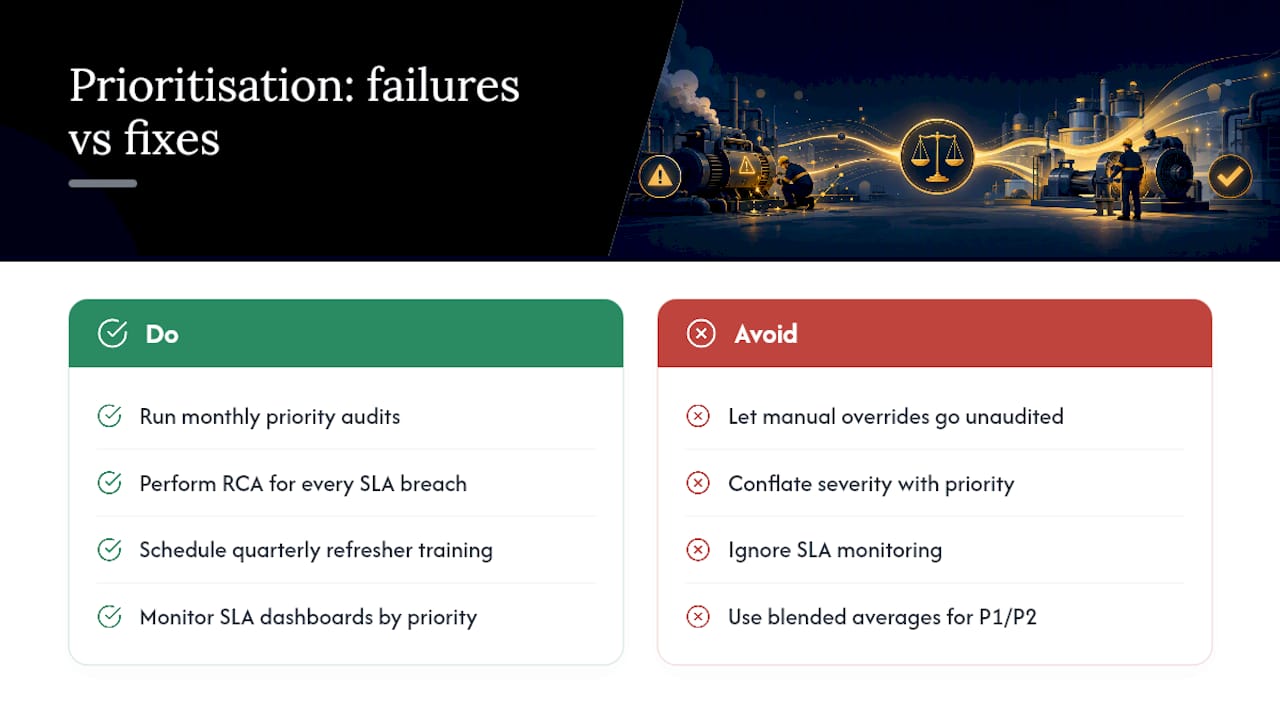
Four failure patterns show up repeatedly once a system's been running a few months. Inconsistent priority coding, where two people rate an identical fault differently depending on mood or workload, tops the list. Conflating severity with priority is a close second, producing SLA reports that look fine on paper while critical jobs quietly slip. Manual overrides applied without any audit trail erode trust in the whole system, because nobody can tell if an override was justified or just convenient. And the absence of SLA monitoring means breaches go unnoticed until a customer complains.
Governance fixes are unglamorous but effective: monthly priority audits sampling a slice of closed tickets, root-cause analysis on every SLA breach rather than just logging it, and refresher training scheduled quarterly rather than once at onboarding.
Four KPIs are worth tracking on a standing dashboard: SLA hit rate by priority level, mean time to respond for P1 and P2 specifically (blended averages hide the failures that matter most), auto-route acceptance rate (how often the system's suggested assignment gets overridden), and rework rate on closed tickets. Teams running structured escalation alerts have reported SLA breaches dropping by around 70% within 30 days of implementation, a figure worth benchmarking your own rollout against.
How Curcle applies this in practice
This platform was built inside a real UK service and engineering business, not designed on a whiteboard, which is why its structure follows the same logic this guide sets out: one connected record for jobs, assets, compliance and SLAs, rather than scattered spreadsheets and inboxes. Its design principle, that every click must earn its place and AI should assist judgement rather than override it, mirrors the human-plus-automation balance recommended above.
..
Five priorities for the week ahead
If you take one thing from this guide, make it this: make priority mandatory on every submission channel this week, switch on P1 alerting immediately, and pull a 30-day SLA report before you touch anything else. Track SLA hit rate weekly. Most teams see measurable gains within 30 to 90 days.
— Luke Herridge
Curcle: a single system for the rules this guide describes
This platform gives you the mandatory priority field, the SLA tracking, and the routing logic in one connected system, rather than a request form, a spreadsheet and a dispatcher's memory doing the job separately. That matters most for compliance-led trades, where a missed P1 isn't just a bad customer experience, it's a safety or regulatory exposure.
If your current process relies on someone manually reading every ticket to decide what's urgent, that's the exact gap Curcle's field service management software is built to close, with asset registers, SLA windows and routing rules sitting inside the same record as the job itself. You can see how the priority matrix and scoring rules translate into an actual working dashboard on the product tour, or check the full feature set covering compliance workflows and stock control alongside scheduling. Book a demo to see your own priority levels configured against real SLA windows.
Sources
- Schedule work orders - Supply Chain Management | Dynamics 365 | Microsoft Learn
- Work Order Prioritization: Severity & SLAs | Xenia
- How work orders are scheduled | Oracle Manufacturing documentation
- Prioritizing Maintenance Work Orders | Reliable Plant
FAQ
What are the five priority levels for tasks?
Most maintenance systems use four levels (P1 critical through P4 routine) rather than five, but some frameworks add a fifth "planning" tier for work with no fixed deadline. A four-level scheme with clear SLA windows is usually sufficient and easier to keep consistent.
What should your top three priorities be at work each day?
A platform like Curcle can surface all three on a single dashboard rather than requiring separate checks.
What is the 1-3-5 rule for prioritising tasks?
The 1-3-5 rule is a personal productivity method: plan one big task, three medium tasks and five small tasks each day. It's a useful discipline for individual workload planning, but it doesn't replace a formal urgency-impact matrix for ranking maintenance work orders across a team.
What are the five D's of prioritisation?
Definitions vary across sources, but a common version covers Do, Delegate, Defer, Delete and Diagnose, used as a quick filter for individual task management rather than a formal work order scoring system.
How does automation improve work order prioritisation?
Automation removes manual triage by applying the priority matrix, routing rules and escalation alerts consistently every time, which is where reported SLA breach reductions of around 70% come from in early rollouts.