

Work in progress tracking is the live status of every job, technician and asset moving through your business, updated as it happens rather than reconstructed after the fact. For compliance-led service businesses, the payoff is simple: you see a delay or a missed certificate while there's still time to fix it, not when a customer or auditor points it out. Real-time visibility turns raw job data into something you can act on immediately, and platforms like Curcle are built specifically to give operations managers that view.
TL;DR:
- Tracking system should focus on a simple, specific status taxonomy with timestamps, GPS locations, and evidence like photos or signatures to improve accuracy.
- Mobile capture of real-time updates reduces manual data entry, minimizes missed appointments, and enhances compliance documentation for audits.
- Integrating live dashboards with dynamic dispatch and stock control significantly boosts first-time fix rates and reduces repeat visits.
- Successful rollout requires starting small, prioritizing mobile usability, and measuring key metrics like first-time fix rate and SLA compliance weekly.
- Most failures stem from over-complicating statuses or poor mobile UX; fixing these early prevents messy data and ensures reliable tracking.
Table of Contents
- What real-time work in progress tracking actually looks like
- The features and integrations that make tracking useful, not just visible
- How to roll out WIP tracking without grinding operations to a halt
- The metrics that tell you the rollout is working
- Where WIP tracking rollouts usually go wrong
- An operations leader's honest take on tracking systems
- See how Curcle handles this in practice
- Sources
What real-time work in progress tracking actually looks like
A useful status taxonomy is short and specific: dispatched, travelling, on site, in progress, awaiting part, and complete. Anything longer than that starts to blur, and engineers stop bothering to update it accurately. The value isn't in the labels themselves. It's in what gets attached to each one.
Every status change should carry a timestamp, GPS location where relevant, and enough evidence that nobody has to phone the engineer to ask "what's happening on site?" That means photos of the fault or the finished work, parts used pulled from stock, compliance checks ticked off against the right certificate, and a customer signature captured on the device, not scrawled on a paper docket that gets lost in a van door pocket for three weeks.
Mobile capture is what makes this workable rather than aspirational. When an engineer logs a job update from their phone in the moment, nobody's re-typing handwritten notes into a spreadsheet that evening. Work order status tracking systems that record timestamps, location and progress indicators give managers a genuine picture of where each job sits in its lifecycle, not a guess based on yesterday's paperwork.
The operational case is direct:
- Fewer missed appointments, because a stalled job shows up on a dashboard within minutes, not at the end of the day
- Fewer repeat truck rolls, since the engineer arrives already knowing what part was needed last time
- Faster resolution, which tends to be the single biggest driver of how satisfied customers actually feel about the visit
- Cleaner audit trails, because compliance evidence lands against the job automatically rather than being chased afterwards
The features and integrations that make tracking useful, not just visible
A live dashboard on its own doesn't fix anything. It's what's connected underneath it that turns visibility into action.
Dispatch needs to be dynamic, not a morning schedule printed and forgotten by 10am. ETA tracking tied to technician location means the office can reschedule around traffic, a job overrunning, or a no-show, without waiting for the engineer to call in. Work order management that centralises creation, assignment and tracking is what lets continuous rescheduling happen without a dispatcher juggling three spreadsheets and a WhatsApp group.
Parts and stock control matter more than most operations managers give them credit for. If an engineer books out a part against the job and the system knows what's left in the van and the depot, first-time fix rates climb because nobody's guessing what's in stock before they set off.
Asset history and compliance evidence need to sit with the job, not in a separate folder somewhere. When a LOLER inspection or an EICR certificate is generated and filed against the specific asset the moment the job closes, you've got an audit trail that holds up without anyone digging through email attachments.
Look for these capabilities specifically:
- Automated SLA triggers that flag a job at risk before the deadline, not after
- Customer communication that fires automatically on status change (en route, delayed, complete)
- Direct integration to invoicing, so a completed job with signed-off parts becomes a draft invoice, not a data entry task
- Accounting, vehicle telematics and document storage integrations that stop double handling of the same information
Pro Tip: Before you shortlist any platform, list every piece of paper your engineers currently carry and ask which of those documents the system needs to replace on day one. If it can't replace the certificate pad, it isn't ready.
How to roll out WIP tracking without grinding operations to a halt
Trying to digitise everything at once is how rollouts die. Pick one trade, one depot, or one contract and prove the concept before you scale it.
- Choose a measurable pilot. Pick a team and set one or two numbers you'll track from day one, such as first-time fix rate or number of status updates logged per job.
- Define a minimal status taxonomy. Six stages, not sixteen. Add required fields only where they're genuinely needed for compliance or invoicing.
- Prioritise mobile UX over features. Single-tap status updates and offline capability matter more than a long list of settings nobody will use in a van with patchy signal.
- Connect invoicing and asset registers first. These two integrations deliver the fastest, most visible admin savings and build trust in the system quickly.
- Train on real jobs, not demo data. Run the first week alongside existing paper processes, then drop the paper once engineers trust the app.
- Measure weekly and share results. Show the pilot team their own improved numbers. Early wins, made visible, are what get the rest of the business on board.
Pro Tip: Run the pilot with your most sceptical engineer, not your most enthusiastic one. If it survives them, it'll survive the rollout.
The metrics that tell you the rollout is working
Five numbers matter more than the rest: first-time fix rate, repeat truck rolls, SLA compliance percentage, average job cycle time, and technician utilisation. Track these weekly during a pilot and monthly once live.
The ROI calculation isn't complicated. Add up the average cost of a repeat visit (fuel, engineer time, lost capacity elsewhere), the admin hours saved by not re-keying job data into invoices, and any SLA penalty fines avoided. Set that total against the subscription cost of the platform.
Real-time visibility isn't an optional extra sitting on top of field service operations. It's the foundation that first-time fix improvements, SLA management and reliable reporting all depend on.
Watch for these signals that a rollout is genuinely working:
- First-time fix rate climbing month on month, not just after the pilot's initial novelty wears off
- Repeat truck rolls dropping as parts data links properly to job history
- SLA compliance holding steady even as job volume increases
- Job cycle time shortening because engineers spend less time on admin between visits
Review the dashboard weekly with the pilot team, then move to a monthly cadence with the wider business once the numbers stabilise. Curcle's savings calculator is a reasonable starting point if you want a rough figure before committing to a full rollout.
Where WIP tracking rollouts usually go wrong
Most failures aren't technical. They're the result of a handful of predictable, avoidable choices made early.
- Status bloat. Adding a stage for every edge case turns the taxonomy into something engineers ignore. Keep it to the six or seven stages that actually change what happens next.
- Clunky mobile UX. If updating a job takes more than a couple of taps, or fails without signal, engineers will revert to paper within a fortnight.
- Parts logged but not linked to stock. Recording what was used without deducting it from inventory guarantees the next engineer turns up without the part they need.
- Compliance evidence treated as optional. If a certificate or signature can be skipped and the job still closes, it will be skipped, and you'll find out during an audit, not before.
None of these are hard to fix. They just need deciding before rollout, not discovered three months in when the data's already messy.
An operations leader's honest take on tracking systems
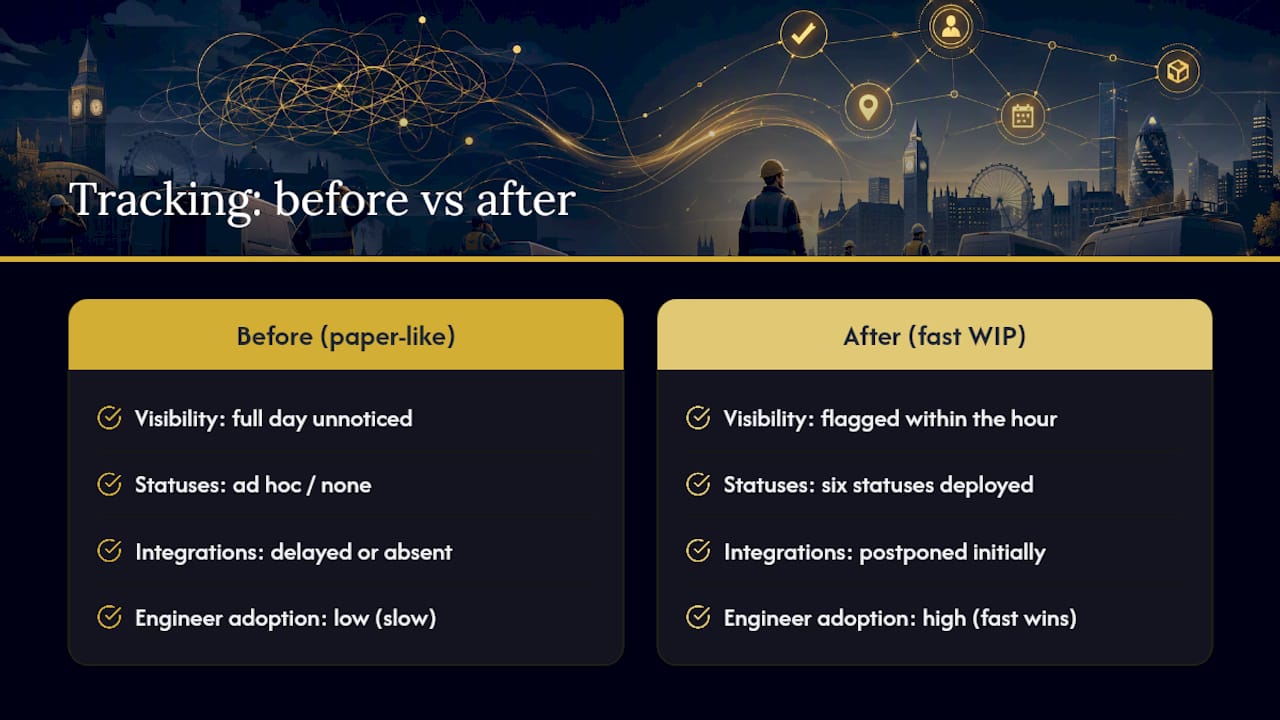
Most WIP tracking rollouts fail for the same reason paper systems fail: someone builds a process for how work should happen rather than how it actually does. Before proper visibility, a stalled job could sit unnoticed for a full day. After it, the same delay gets flagged within the hour, often before the customer even calls to ask.
The trade-off worth accepting early is speed over completeness. Launch with six statuses and no integrations rather than waiting six months for the perfect system. Engineers adopt what's fast. They abandon what's thorough but slow.
— Luke Herridge
See how Curcle handles this in practice
Curcle exists because paper dockets, disconnected spreadsheets and end-of-day guesswork cost real UK service businesses real money, and the platform was built inside one of those businesses rather than designed at a distance from the problem. Jobs, engineers, assets, compliance certificates, stock and invoicing sit in one connected system, so a completed job with signed-off parts becomes an invoice without anyone re-typing a thing.

The mobile app works offline, captures photos and signatures at the point of work, and files compliance evidence such as Gas Safe, EICR or LOLER records directly against the right asset, so nothing gets chased down after the fact. Explore the full feature set or see how it maps to your trade on the industries page if you run HVAC, electrical, facilities or multi-site maintenance work. When you're ready to see it running against real job data rather than a demo script, book a walkthrough of the platform and bring your messiest current process. That's usually the fastest way to see what changes.
Sources
- Real‑time data in field service: a game changer for operational efficiency | Forbes
- The benefits and ROI of real‑time visibility in field service | Dispatch
- What is work order management software? | Salesforce