
Track serial numbers for every warrantied, safety-critical or legally inspected asset you install, starting now. Capture the serial at install or backfill your highest-risk equipment first, then link each one to your asset register and job history. That single link is what turns a warranty dispute or an inspection audit into a two-minute lookup instead of a half-day search.
TL;DR:
- Tracking serial numbers for high-value, safety-critical, or warrantied equipment allows instant verification of warranty, service history, and parts used, reducing audit time significantly.
- Implementing serial number tracking should start with critical assets, using barcode or QR code scanning, and be integrated into every maintenance or service job to ensure consistent data capture.
- Data governance rules, such as mandatory fields, duplicate checks, and ownership restrictions, are essential to keep the asset register accurate and up-to-date over time.
- Software supporting this workflow must enable offline mobile scanning, link assets to jobs and parts, provide automatic warranty alerts, and maintain a full audit trail of changes.
- A pilot project with a small asset set and clear success criteria can validate the process and lay the groundwork for a wider rollout across the entire estate.
Table of Contents
- What is serial number tracking in field service?
- Core data fields every serial-number record must store
- How to implement serial number tracking, step by step
- What software needs to do to support this properly
- Data governance rules that stop your register rotting
- Reporting, audits and compliance: where the payback shows up
- A quick pilot checklist you can start this week
- Field perspective: why one register beats three spreadsheets
- Curcle: built to make this workflow stick
- Sources
What is serial number tracking in field service?
Serial number tracking, in this context, means recording the unique identifier stamped on an installed piece of equipment (a boiler, a fire panel, a standby generator) and using it to link that specific unit to everything that happens to it afterwards. This is different from warehouse or manufacturing serialisation, where the goal is tracking stock as it moves through a supply chain. Here, the asset has already left the shelf. It is bolted to a wall or sat in a plant room, and your job is to know exactly what it is, who owns it, and what has been done to it.
Done properly, it answers three questions instantly: is this unit still under warranty, when was it last serviced, and what parts have gone into it. That matters because serialised tracking is most valuable for equipment that is high value, regulated, warrantied or safety-critical — exactly the category most field service and compliance businesses live in. Asset types that typically justify the effort include:
- HVAC units and chillers, where warranty claims hinge on model and serial verification
- Standby generators and UPS systems, where service history proves maintenance compliance
- Fire, gas and life-safety systems, where inspectors expect a documented history per unit
- Specialised controls and BMS panels, where firmware and parts history vary unit to unit
Core data fields every serial-number record must store
A serial number on its own tells you almost nothing. It only becomes useful once it sits inside a record with enough context to answer a technician's or an auditor's question without a phone call.
At minimum, every record needs the serial number, manufacturer, model, customer, site, installation date, purchase date and warranty or entitlement status. Asset records built this way tend to hold up under scrutiny because they map cleanly onto how a service business actually operates: one customer, one site, one asset, one history.
Beyond the basics, operational fields make the record genuinely usable day to day:
- Assigned or last-visiting technician
- Date and outcome of the last service visit
- Parts fitted, with part numbers and dates
- Photos and documents (nameplates, certificates, inspection reports)
- Links to the job or work order each event was raised under
Statistic Callout: A register that supports search by serial, model, customer and technician, and that exports audit-ready reports on demand, is what separates a usable field-service asset register from a static spreadsheet.
Add a barcode or QR label wherever you can, cross-referenced to the job ID and the original purchase order. That cross-reference is what lets you trace a fault back through the parts trail later.
How to implement serial number tracking, step by step
Rolling this out across an entire estate on day one is how most attempts stall. Start narrow, prove the workflow, then widen it.
- Scope the critical 20% first. Prioritise the assets that are safety-critical, still under warranty, or highest replacement cost. Asset lifecycle best practice consistently points to focusing on the fraction of assets that carry most of the risk or revenue before you try to scale anything further.
- Choose your capture method. Barcode or QR scanning on a mobile device beats manual typing every time; field-friendly capture like this drives far higher engineer compliance than desktop-only entry. Where scanning isn't practical, use structured mobile entry forms or bulk supplier import templates rather than free-text fields.
- Backfill with validation, not guesswork. Run sample audits against purchase orders and physical site checks before trusting historic data. Capture that happens at installation, rather than months later, avoids the long-term data-quality problems that plague retrofitted registers.
- Wire it into your workflow. Every job record needs the ability to reference a serial number, and every parts fitting or planned maintenance schedule should link back to that same record. This is the step most teams skip, and it's the one that makes the whole thing pay off.
- Train, then audit. Set a simple field rule (no job closes without a serial reference on covered assets), incentivise clean data at the point of capture, and audit completeness monthly rather than annually.
Pro Tip: Run the pilot on real jobs, not a dummy dataset. Engineers spot friction in a live workflow that never shows up in a training exercise, and you want that feedback before you scale to the full estate.
What software needs to do to support this properly
The technology choice matters less than what it lets your engineers do in the field, and what it lets your office team pull out the other end. A platform that only handles data entry from a desk will never keep pace with how equipment actually moves and gets serviced on site.
Look for these capabilities as non-negotiable:
- Mobile scanning and offline capture, so a signal dead zone in a plant room doesn't break the record
- Asset parent-child relationships, so a control panel inside a larger system stays linked correctly
- Warranty and entitlement fields that flag expiry automatically
- A full audit trail on every change to a record
- Combined purchasing, receiving and field workflows, because equipment moves between warehouses, vehicles, technicians and job sites constantly, and your software needs to follow it there
On integration, plan for links into jobs and work orders, your parts catalogue, purchase orders, invoicing and whatever reporting system your compliance team relies on. When choosing between options, weigh field usability heavily. A system engineers avoid using in the van is a system that quietly stops working within weeks, no matter how good its reporting looks on a desktop.
Data governance rules that stop your register rotting
An asset register degrades the moment nobody owns keeping it accurate. Governance is what stops that.
- Make serial, model and customer mandatory fields with validation at the point of capture, not after the fact
- Enforce a simple uniqueness rule so a duplicate serial gets rejected or flagged for manual review, rather than silently creating two records for one unit
- Assign clear record ownership and restrict who can edit a serial once it's confirmed
- Log every change with a timestamp and the name of whoever made it
- Reconcile against purchase orders and physical site checks on a set schedule, not ad hoc
Pro Tip: Set one KPI your whole team can see: percentage of active assets with a complete record. Watching that number climb (or stall) tells you more about the health of your rollout than any anecdote from the field.
Reporting, audits and compliance: where the payback shows up
This is where serial tracking stops being administrative overhead and starts saving hours. A service-history report pulled by serial number turns a routine inspection into a five-minute conversation instead of a scramble through old paperwork. A warranty-expiry dashboard flags which units are about to lose cover before a customer finds out the hard way. An inspection-history export, ready to hand to an auditor on request, is the difference between a compliance visit that goes smoothly and one that doesn't.
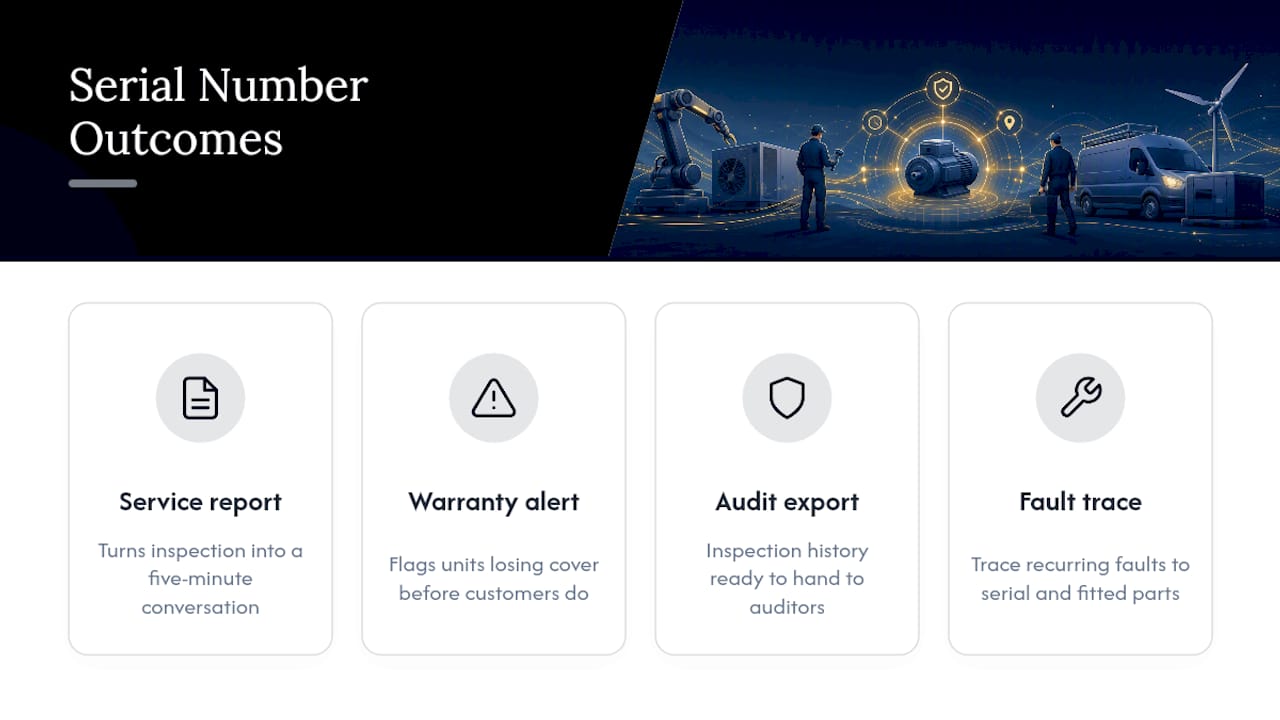
Practically, this means being able to produce full installation and inspection history for a single unit during a compliance check, and being able to trace a recurring fault back to a specific serial and the parts fitted to it.
Statistic Callout: The long-term value of serial tracking comes down to one thing: the permanent history it builds, letting office staff verify a warranty or a service record instantly rather than chasing a paper trail.
Three metrics worth tracking from week one: asset record completeness, time to verify warranty status, and improvements in service efficiency when engineers access full asset history.
A quick pilot checklist you can start this week
- Pick 50 to 100 priority assets (warrantied, safety-critical or highest cost first)
- Assign one owner for the pilot and confirm the capture method (scanning where possible)
- Run a one-week trial with three engineers on live jobs, not test data
- Measure data completeness and average capture time per asset
- Set success criteria, then plan a 30/60/90-day path to wider roll-out
Field perspective: why one register beats three spreadsheets
The businesses that get this right almost always started by fixing the register before touching anything else. A single source of truth means a phone-support call about a fault takes minutes, not an email chain across three departments trying to work out which unit the customer even means.
What surprises most operations teams isn't the technology. It's how much admin time disappears once every engineer trusts the same record enough to stop keeping their own private notes on the side.
— Luke Herridge
Curcle: built to make this workflow stick
Curcle was built inside a real UK service and engineering business, not designed in isolation from what compliance-heavy trades actually deal with daily. That shows in how directly its structure maps onto the steps above: mobile scanning and offline capture for engineers in the field, an asset register that links every serial to jobs, parts and planned maintenance, and compliance inspection scheduling that ties certificates like EICR, LOLER and F-Gas records straight back to the unit they belong to.

For teams still backfilling by spreadsheet, Curcle's feature set covers the asset, job and compliance links this guide walks through, and its free compliance templates give you a starting point for the fields your register needs before you even open the software. If you want to see the mobile capture and reporting workflow in action before committing to anything, book a demo and bring your messiest site to test it against.
Sources
- Asset Tracking Software for Field Service: Why It Matters and How to Choose the Right System - Blog
- Serialized Inventory Management Software for Contractors | Ply
- Serial Number Tracking in Manufacturing: A Guide for SMEs
- Asset Lifecycle Management: Definition & Best Practices