
Route optimisation for field service cuts drive time and lifts the number of completed jobs per technician, all while protecting SLA windows that penalise late arrivals. Done properly, it trims fuel spend, reduces vehicle wear and gives customers a realistic arrival window instead of a guess. The rest of this guide covers how the underlying engines actually work, the features worth demanding from any routing tool, and how to roll one out without breaking your dispatchers' trust in it.
TL;DR:
- Proper route optimisation can save fuel, reduce vehicle wear, and improve SLA compliance, especially in complex scenarios like multi-day or multi-vehicle jobs.
- Effectiveness depends on accurate data such as postcodes, job durations, skills, stock levels, and real-time traffic, with integration into existing management systems.
- Human oversight remains crucial, as algorithms can miss context such as road conditions or customer preferences, requiring dispatcher intervention.
- Testing routines in shadow mode for two to four weeks helps identify edge cases and prevents operational failures once routes are live.
- Single-system solutions like Curcle provide integrated job, stock, and compliance data, supporting better route planning and real-time updates.
Table of Contents
- What route optimisation delivers for field-service operations
- How route optimisation actually works: VRP, constraints and re-optimisation
- Feature checklist: what to prioritise when evaluating routing tools
- How to implement route optimisation without breaking dispatch
- Measuring success: KPIs and a simple ROI calculation
- Common pitfalls and best practices
- What actually matters once the software is switched on
- How Curcle supports route-aware field operations
- Primary sources and further reading
- Sources
What route optimisation delivers for field-service operations
Reduced drive time is the headline benefit, but it's the knock-on effects that change a business. Less time on the road means more billable hours, lower fuel costs and less wear on vans that already spend too much time in a garage. Technicians who aren't stuck in traffic between jobs finish their day earlier or take on an extra call-out, and customers get an arrival window that actually holds up.
The gains show up differently depending on the type of work:
- Reactive call-outs — engines re-sequence the day as jobs come in, slotting urgent visits between scheduled ones without wrecking the rest of the round.
- Planned maintenance (PPM) rounds — recurring visits get grouped geographically so a week of boiler services doesn't zigzag across a county.
- Multi-stop servicing — technicians carrying several jobs a day benefit most from sequencing that accounts for parking, access windows and service duration, not just distance.
- Compliance visits — LOLER, EICR or Gas Safe inspections with fixed renewal dates get scheduled proactively rather than squeezed in wherever there's a gap.
Salesforce's overview of field-service route optimisation points to measurable gains in on time arrivals and reduced mileage as the direct result of better sequencing, alongside a lighter environmental footprint from less idling and backtracking. For a business running twenty vans, even a modest cut in daily mileage compounds into a meaningful annual fuel and maintenance saving.
How route optimisation actually works: VRP, constraints and re-optimisation
Underneath every routing tool sits a version of the vehicle routing problem, or VRP: given a set of jobs, vehicles and technicians, what's the sequence that meets every constraint while minimising travel? It's a much harder problem than it sounds, because "minimising travel" is rarely the only goal. Most field-service routing engines are actually solving for several objectives at once: least total drive time, on time SLA delivery, and balanced workload across the team so one technician isn't buried while another finishes by lunch.
The constraints are where field service gets complicated compared to, say, parcel delivery. A solver has to respect:
- Skills and certifications — an F-Gas job can't go to a technician without the right ticket, no matter how close they are.
- Time windows — a customer who's only in between 2pm and 4pm limits where that job can sit in the sequence.
- Vehicle capacity and stock — a job needing a part the van doesn't carry either gets rerouted via a depot or reassigned.
- Breaks and working hours — statutory rest breaks and shift limits box in the day before travel is even considered.
- Job dependencies — a follow-up repair can't be scheduled before the diagnostic visit that identifies the fault.
Static routing, planned once each morning, breaks down the moment traffic, a cancellation or an emergency call-out hits, making AI-driven routing essential for adapting schedules dynamically. That's why AI-assisted dynamic routing has become close to essential for handling real-time disruption, recalculating the remaining stops without unpicking the technician's current job. Even so, human override has to stay in the loop. A dispatcher who knows a customer is difficult, or that a particular road floods after rain, is making a judgement no algorithm has the context for.
Feature checklist: what to prioritise when evaluating routing tools
Most routing software looks similar in a sales demo. The differences show up once you're running fifty jobs a day across a mixed-skill team, so run any shortlist against this checklist before signing anything.
- Skill and certification matching. The tool should refuse to assign a Gas Safe job to an uncertified engineer, and it should sequence multi-technician jobs so specialists arrive together, not in staggered chaos.
- Parts and stock awareness. Routing that ignores van stock will happily send someone to a job they can't finish. Look for routing tied to inventory data, not a separate spreadsheet.
- SLA and time-window enforcement. Contracts with penalty clauses need routing that treats the window as a hard constraint, not a preference.
- Multi-day and depot-aware planning. Rounds that span several days, or start and end at different depots, need sequencing that respects shift boundaries and overnight logistics.
- Real-time inputs. Live traffic and telematics feeds matter more than a static map, especially for engineers covering wide rural areas.
- Offline-capable mobile app. A technician in a basement plant room with no signal still needs their route and job details to load.
- FSM and inventory integrations. Routing bolted onto a separate system, disconnected from job records and stock levels, generates more admin than it saves.
Pro Tip: Test any shortlisted tool against your worst day, not your best one. A cancelled morning job, an emergency call-out and a technician calling in sick will tell you more about a routing engine than a clean week ever will.
How to implement route optimisation without breaking dispatch
Start with data, not software. Address hygiene matters more than people expect. If half your job records have a postcode but no house number, the router will happily send someone to the wrong end of a street. Realistic job durations matter just as much. A boiler service logged as "30 minutes" when it reliably takes 50 will quietly wreck every route built around it.
Integration comes next. Routing only earns its keep when it's connected to your field service management system, so job status, stock levels and customer records all update from one place rather than three. Telematics feeds and customer notification tools should sit in that same connected loop rather than bolted on separately.
Pilot small. Pick one depot or one team, measure baseline KPIs for two to four weeks, and run the new routes in shadow mode alongside the existing plan before anyone actually drives them. Simple Scheduler's approach to this, previewing proposed routes to dispatchers before publishing them live, keeps a human checkpoint between the algorithm and the road.
- Train dispatchers on when and how to override a suggested route.
- Set a simple governance rule: who can change a published route, and under what circumstances.
- Keep an exception list for VIP customers, access-restricted sites and recurring problem addresses.
Pro Tip: Run the shadow period longer than feels necessary. Two weeks rarely surfaces the edge cases; four usually does.
Measuring success: KPIs and a simple ROI calculation
Track a small set of numbers before and after rollout, not everything at once. The ones that matter most:
- Miles driven per completed job
- Drive time per technician shift
- Jobs completed per technician per day
- SLA compliance rate
- First-time fix rate
Baseline these for two to four weeks before any change, then compare against the same period post rollout under similar demand. Run your own numbers through a savings calculator rather than relying on vendor averages, since job mix and geography change the maths considerably.
Common pitfalls and best practices
The biggest mistake is treating scheduling and routing as two separate steps. Assigning jobs first and routing second, rather than solving both together, routinely produces technically valid but operationally poor routes. Keep manual override available at all times.
- Solve assignment and sequencing together where the tool allows it.
- Never let dispatchers lose the ability to intervene manually.
- Rebuild service-duration estimates from real job history, not guesswork.
- Test routes against a genuinely bad day before trusting them on a normal one.
Pro Tip: If dispatchers keep quietly overriding the same type of route, that's not user error. It's the algorithm telling you a constraint is missing.
What actually matters once the software is switched on
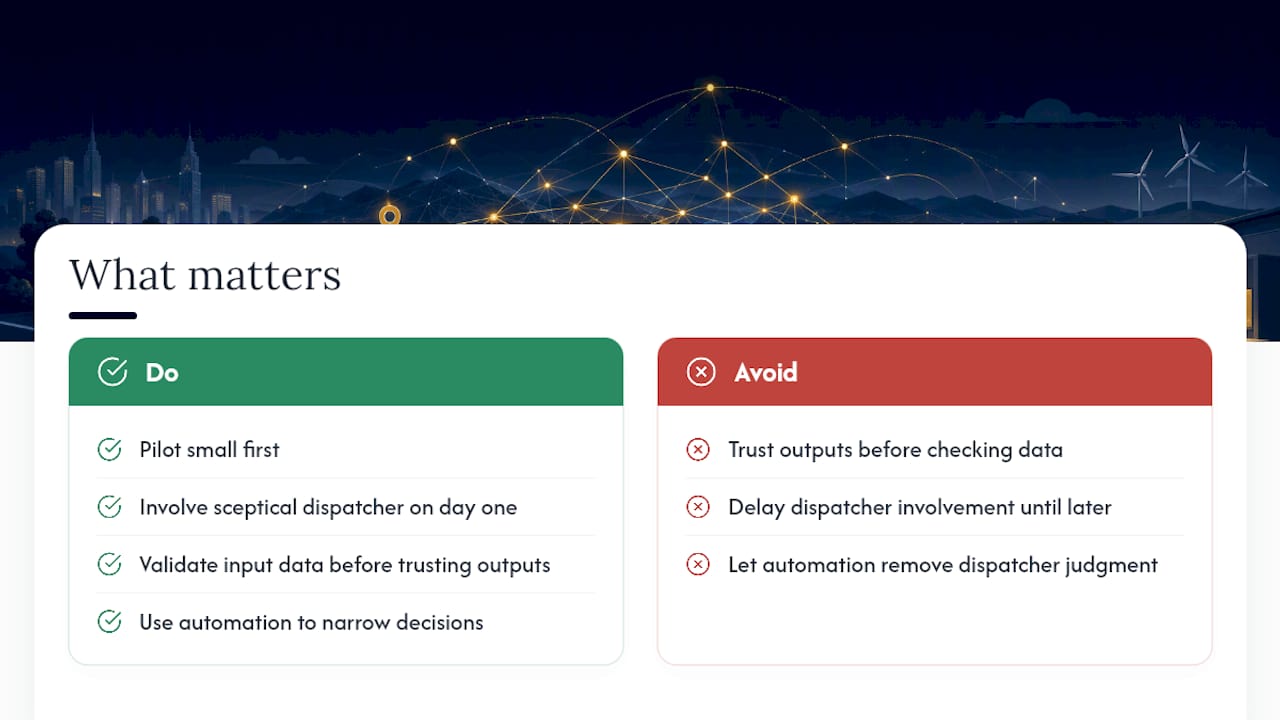
The industry sells route optimisation as a set-and-forget upgrade. It isn't. The tools genuinely work, but every rollout I've looked at that failed did so for the same reason: someone trusted the output before they'd trusted the data feeding it.
Pilot small, and involve your most sceptical dispatcher from day one, not week four. Their objections are usually the edge cases the algorithm hasn't met yet. Automation should narrow the decisions a dispatcher has to make, not remove their judgement from the day entirely.
— Luke Herridge
How Curcle supports route-aware field operations
Curcle gives you one system where job scheduling, stock levels, compliance records and engineer certifications already sit together, so any routing decision respects what's actually in the van and who's actually qualified for the job. That connection is what most routing tools bolt on afterwards; Curcle was built around it from the start.
Because Curcle brings jobs, assets, stock and compliance into a single system, your dispatchers see the same information your technicians see on their mobile app, offline capability included. For businesses managing multi-site contracts and SLA-heavy work, that visibility matters more than another dashboard. If your routing plans keep falling apart because the software feeding them doesn't talk to your job records, take a look at Curcle's product tour and see how it fits your operation before booking a demo.
Primary sources and further reading
- Route Optimization API | Google for Developers
- Route optimisation: a complete guide | Salesforce
- RSO overview | Microsoft Learn
- Field service mapping & routing software | Maptive
Sources
- Route Optimization API | Google for Developers
- Route optimisation: a complete guide | Salesforce
- Field service mapping & routing software | Maptive