

A lone worker check-in is a scheduled confirmation, by app, call, or message, that a person working alone is safe. It works as a control once a risk assessment shows lone working is permissible with monitoring, not as a substitute for that assessment. If you're setting one up, start today with a quick risk triage across your lone-working roles and pick one team as a pilot before rolling out further.
TL;DR:
- Automated check-ins should be scheduled based on the task's risk level, with intervals ranging from 15 minutes for high-risk work to several hours for low-risk tasks.
- A grace period of five to ten minutes is typical before escalation, which involves alerting a welfare monitor, then a manager, and finally emergency services if needed.
- Using local storage and offline queuing minimizes false alarms caused by signal loss, but procedures must distinguish between no response and no signal.
- Check-ins linked to job start and end events prevent false escalations, with clear ownership assigned for monitoring and responding to alerts.
- Proper training, risk assessment, and documented procedures are essential, as no single app alone guarantees compliance under HSE standards.
Table of Contents
- How do lone worker check-ins actually work?
- Which check-in method suits your workforce?
- How do you schedule check-ins and design escalation?
- What does HSE guidance require of employers?
- Building check-ins into everyday job workflows
- How Curcle keeps check-ins tied to the job, not a separate app
- Where check-in rollouts usually go wrong
- Sources
- FAQ
How do lone worker check-ins actually work?
Most systems run on one of two logics: scheduled check-ins, where the worker confirms safety at fixed intervals, or session-based check-ins, tied to the start and end of a specific task or visit. Both log a timestamp automatically. Many also capture GPS location and allow a short message or voice note describing status, as SoloProtect's check-in feature illustrates with its timestamped message format.
The mechanics that matter operationally are the grace period and the escalation ladder that follows a missed check-in. A worker who doesn't respond within the set window is not flagged instantly. There's a buffer, then a retry, then escalation.
Typical configuration looks like this:
- Check-in prompt sent at a scheduled time or logged manually by the worker
- Grace period (commonly 5 to 15 minutes) allows for a late response before anything triggers
- Automatic escalation alerts a welfare monitor, then a manager, if the grace period lapses
- Incident log records every prompt, response, and escalation for later review
Configurable intervals and automatic escalation are standard features across most vendor platforms, typically adjustable from 15 minutes to several hours depending on task risk. Where signal is poor, decent systems queue the check-in data locally and sync once connectivity returns, rather than treating a dropped signal as a missed check-in outright. That distinction between "no signal" and "no response" is one many procedures fail to build in, and it's usually the first thing that causes false alarms in the field.
Which check-in method suits your workforce?
There's no single right answer here. It depends on device access, connectivity, and how much friction your workers will tolerate before they start ignoring the system.
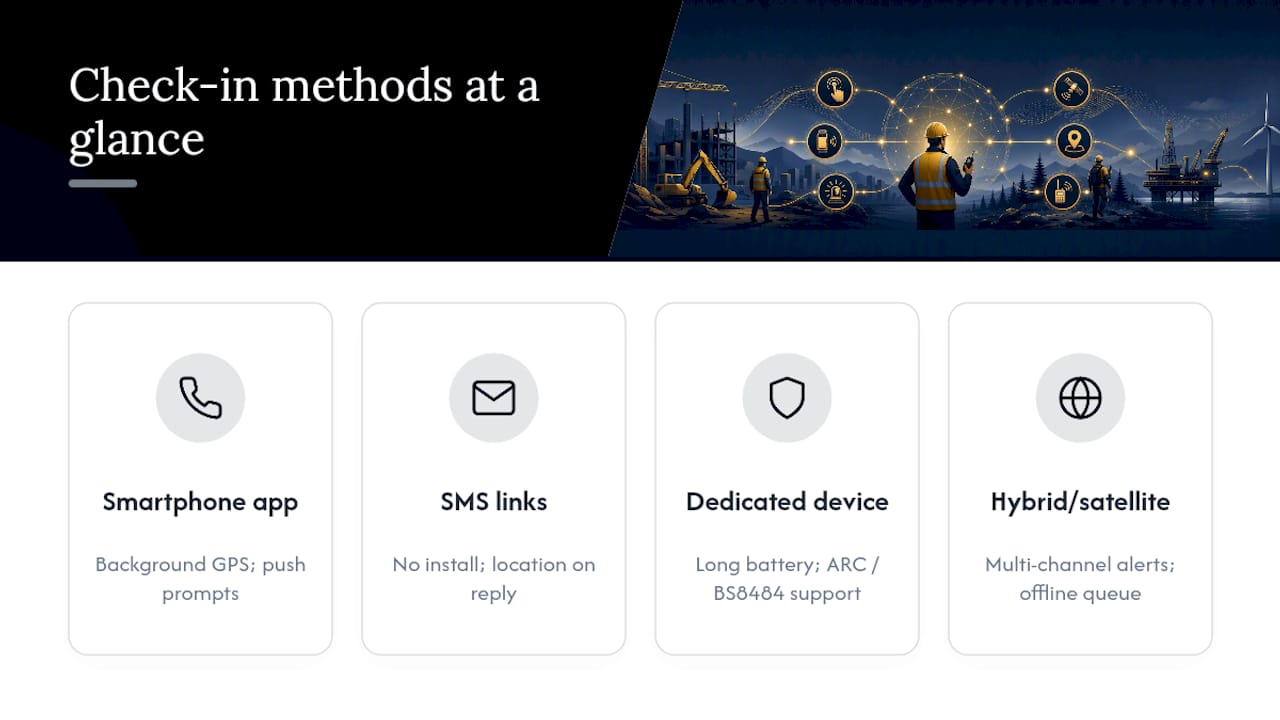
Smartphone apps give you the richest feature set: background location tracking, push-based prompts, panic buttons, and two-way messaging. The trade-off is battery drain from constant GPS polling and the need for workers to actually install and open the app, which some frontline staff resist.
SMS or persistent web links need no installation at all. A worker taps a link or replies to a text to confirm safety, and location is captured only at the moment of reply, not continuously. This suits workers on basic phones or in roles where employees are reluctant to install monitoring software on personal devices, and it tends to lift compliance simply because there's nothing to set up.
Dedicated lone worker devices sit at the higher end: purpose-built hardware, longer battery life, and often a link to an Alarm Receiving Centre (ARC). Devices meeting BS 8484 standards can trigger a police-priority response through a Unique Reference Number, which matters for genuinely high-risk roles but adds ongoing monitoring costs that many office-based or moderate-risk teams don't need.
Hybrid and satellite fallback setups cover the gap for remote or underground work. Some platforms offer multi-channel escalation and offline queuing, routing alerts through SMS, email, and phone simultaneously when primary connectivity fails, with satellite integration for genuinely off-grid sites.
How do you schedule check-ins and design escalation?
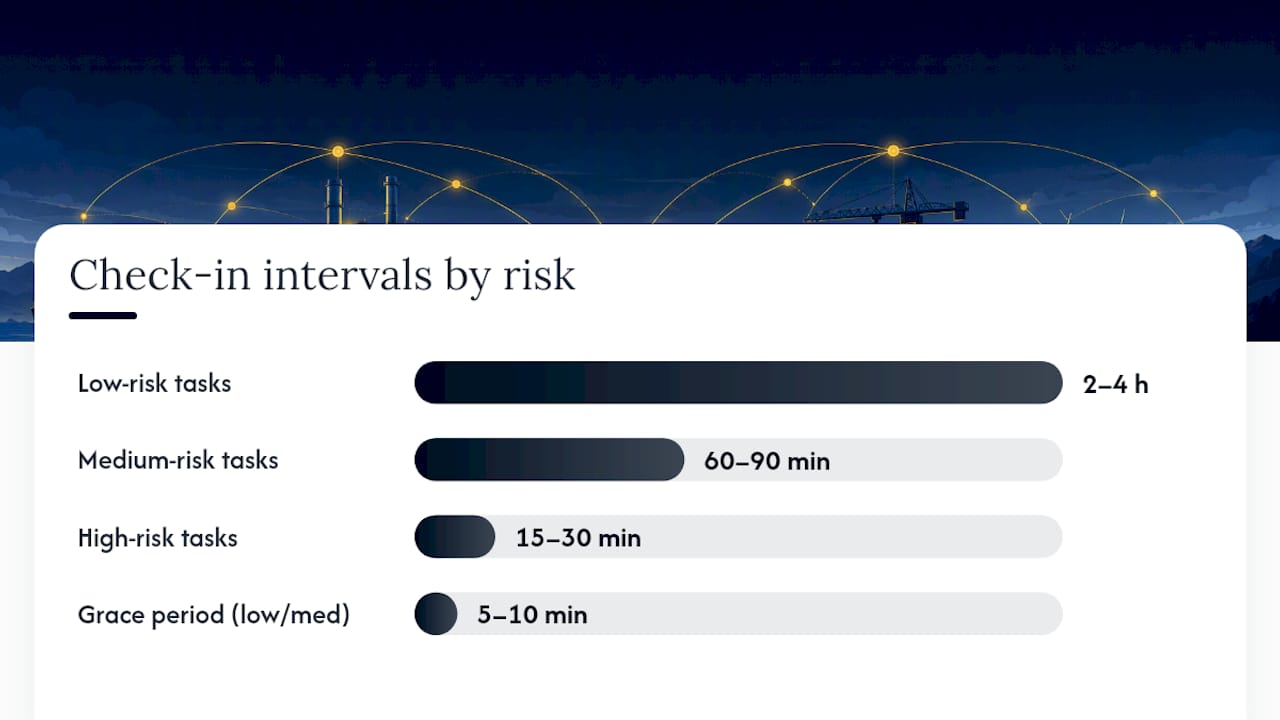
Interval choice should follow the risk level of the task, not a blanket company-wide default. A lone security guard doing a static night shift doesn't need the same cadence as an engineer working alone on live electrical systems.
Rough starting points:
- Low-risk tasks (desk-based, static site visits): check-in every 2 to 4 hours
- Medium-risk tasks (routine field visits, driving between sites): check-in every 60 to 90 minutes
- High-risk tasks (confined spaces, working at height, lone site access after hours): check-in every 15 to 30 minutes
- Grace period: 5 to 10 minutes for low and medium risk, tighter for high risk, with one automatic retry before escalation fires
- Escalation ladder: welfare monitor first, then direct line manager, then named emergency contacts, then emergency services if none of the above acknowledge within an agreed window
Every stage of that ladder needs a named owner who knows they're on it. A generic "the office will pick this up" instruction fails the moment two people both assume the other has it covered.
A simple checklist to implement this week:
- List every lone-working role and its current control gaps
- Assign a check-in interval per role based on task risk, not habit
- Name a welfare monitor and a backup for every shift pattern
- Set grace periods and confirm who receives the escalation alert at each stage
- Test the full ladder end to end, including a deliberately missed check-in
What does HSE guidance require of employers?
HSE guidance is clear that check-ins are one control among several, chosen after a proper risk assessment of the specific role rather than adopted as a blanket default. The regulator expects employers to assess whether a task can be done safely alone at all, then apply proportionate controls, which might include supervision, training, or a monitoring system, depending on what the risk assessment turns up.
Training matters as much as the technology. HSE specifically notes that where supervision is limited, workers must be competent and trained in whatever technical solution they're using, including knowing exactly what happens if they miss a check-in.
BS 8484 and ARC-monitored devices become relevant specifically where a genuine emergency response with police priority is a realistic requirement, not for every lone worker by default. And regardless of which method you choose, no single app makes a business compliant on its own. The written procedure, the risk assessment, and the audit trail behind the tool are what a regulator or investigator will actually ask to see.
Building check-ins into everyday job workflows
Check-ins work best when they're not a separate system your team has to remember to open. Tying a check-in prompt to a job's start and finish events, rather than running it on an unrelated timer, means the safety process follows the actual work rather than a generic clock.
Pro Tip: Link the check-in schedule to the job record itself, so a longer-than-expected job automatically extends the monitoring window instead of triggering a false escalation the moment the original estimate runs out.
Assigning welfare monitors and escalation owners inside your existing organisational structure, rather than as an afterthought, closes the gap where alerts get sent but nobody's actually watching the dashboard. The logs generated by automated check-in systems become genuinely useful here: they feed audits, support SLA reviews, and give you a clean timeline to work from if an incident needs investigating afterwards.
Automation's real value is catching what a busy supervisor misses: an overdue session flagged the moment it lapses, rather than discovered at the end of a shift. A practical checklist for structuring reliable check-ins in field service settings makes the same point: the process only holds up if someone is accountable for reacting to the alert, not just receiving it.
How Curcle keeps check-ins tied to the job, not a separate app
For compliance-heavy field teams, the problem usually isn't the check-in itself. It's that the check-in lives in one system, the job lives in another, and nobody has time to reconcile the two after the fact. Some platforms keep job-driven workflows, notifications, and compliance logging in one place, so a check-in tied to a live job automatically feeds the same audit trail as the certificate, the site record, and the SLA review.

That matters most for multi-site operations and compliance-led trades juggling engineers, contractors, and out-of-hours callouts across dozens of sites at once, where a missed check-in needs to reach the right person in minutes, not surface in a report next week. Curcle's feature set covers the notification and reporting layer that turns a check-in log into something a manager can actually act on and later show an auditor. If you want to see how that fits your own job structure before committing to anything, book a product tour and walk through it against a real lone-working scenario from your own operation.
Where check-in rollouts usually go wrong
The most common mistake is setting check-in intervals too tight. A 10-minute cycle for a low-risk task doesn't add safety, it just trains workers to dismiss prompts, which is worse than no system at all.
Keep procedures simple enough that a new starter can follow them without a briefing document. Assign clear escalation ownership before launch, and actually test the ladder with a deliberately missed check-in rather than assuming it'll work on the day it matters. Use the resulting data to refine intervals and routes, never to discipline workers for a late reply. That's how you lose buy-in permanently.
— Luke Herridge
Sources
For the regulatory baseline, HSE's guidance on training, supervision and monitoring sets out what's expected of employers. For the mechanics of check-in features, message formats, and escalation options, SoloProtect's check-in explainer and SmartQHSE's feature breakdown both cover the technical detail in more depth than this guide.
- Training, supervision and monitoring - Lone working (HSE)
- Lone Worker Safety Software | Check-In & Monitoring (SmartQHSE)
- Automated Welfare Check-Ins by SMS & App | Not A Lone Worker
- Check-In Feature for Lone Worker Safety (SoloProtect)
FAQ
What are the legal rules for lone workers in the UK?
There's no single lone-working law, but employers must risk-assess any role done alone and apply proportionate controls, which HSE guidance frames as training, supervision, and monitoring rather than a fixed checklist.
How much does a lone worker device cost?
Costs vary widely by device type and whether it includes ongoing ARC monitoring; app-free SMS or web-link check-ins typically cost far less than a BS 8484 monitored device with a live response service.
What should you have by law if you lone work?
You need a documented risk assessment for the role, a written lone-working procedure, and a monitoring or check-in arrangement suited to the risk level identified, backed by training on how it works.
What are the HSE requirements for lone working?
HSE expects a risk assessment specific to the task, proportionate controls chosen from that assessment, and adequate training so workers understand what happens if a check-in is missed, as set out in its monitoring guidance.