

An invoice approval workflow is the rules-based path an invoice follows from receipt to authorised-for-payment, moving through capture, matching, coding and sign-off before it ever reaches the payment run. A well-designed one delivers three things you can actually measure:
- Faster cycle times — invoices clear approval in days, not weeks
- Fewer errors and duplicates — matching catches problems before an approver ever sees them
- A complete, timestamped audit trail — every decision is recorded, not buried in an inbox
Getting there normally means two things working together: automation that removes manual chasing, and a documented delegation of authority (DOA) that tells the system exactly who approves what.
Key Takeaways
An invoice approval workflow only performs well when a documented approval matrix, rule-based routing and an auditable trail work together, not in isolation.
| Point | Details |
|---|---|
| Define the DOA first | Codify amount bands and named approvers before automating anything, or automation just speeds up chaos. |
| Match before you route | Two-way or three-way matching catches errors upstream, keeping exception rates in the single digits. |
| Track five core metrics | Approval time, touchless rate, exception rate, cost per invoice, and percentage outside SLA. |
| Pilot on top suppliers | Test new rules against your highest-volume vendors before extending them company-wide. |
| Connect invoices to context | Curcle links jobs, compliance and invoicing in one system, so approvers see the full picture, not just a PDF. |
Table of Contents
- What does an invoice approval workflow actually cover?
- How does the invoice approval process actually work, step by step?
- Why do invoice approvals keep getting stuck?
- What does automation actually fix, and what should you expect from it?
- How do you design an approval matrix that actually works?
- How do you connect the workflow to your systems and measure it?
- What can operations teams learn from rolling this out in the field?
- Where most invoice workflow advice gets it wrong
- A connected way to run invoice approvals for service businesses
- Sources
What does an invoice approval workflow actually cover?
It's easy to conflate "invoice processing" with "invoice approval," but they're different jobs. Processing is the mechanical side: receiving the document, extracting the data, matching it against a purchase order. Approval is the judgement layer sitting on top of it, the part where a human confirms the spend was legitimate, coded correctly, and authorised by someone with the right level of sign-off.
Four roles typically touch an invoice on its way through:
- Accounts payable — owns intake, data capture and matching
- The budget owner or department head — confirms the spend is genuine and correctly coded
- The requester — provides context when a PO is missing or unclear
- Payments — schedules and releases funds once approval is complete
The workflow exists to enforce three control objectives: that the invoice is legitimate, that the coding is accurate, and that whoever signed it off actually had the authority to. Stampli's breakdown of invoice approval frames this well: the rules determine who reviews, in what order, and what evidence the decision leaves behind.
How does the invoice approval process actually work, step by step?
The canonical sequence has six stages, and most stalled invoices fail at one of them. Here's the order that works:
- Intake. Pick one channel, not five. Email, a vendor portal or EDI feed, but a single point of entry stops invoices arriving in three different formats with three different tracking methods.
- Capture. OCR or e-invoice parsing pulls out the vendor, PO number, line items, tax and totals. Check these fields land correctly before anything moves further, because errors here propagate through the whole workflow.
- Match. Two-way matching checks the invoice against the PO; three-way matching adds the goods receipt note. Use three-way for anything stock or asset-related, two-way for services where a receipt doesn't apply.
- Code. GL code, cost centre, and project reference get attached before the invoice goes anywhere near an approver. An approver without coding context is an approver guessing.
- Route and approve. Rule-based routing sends the invoice to the right person automatically, and every approval gets a timestamp. Anything that fails matching or coding drops into an exception queue rather than blocking the main flow.
- Post. Once approved, the invoice posts to the ERP and joins the payment run on schedule.
The full six-stage structure, from intake through validation to posting, follows the design ininvoice sets out for supplier invoice workflows, and it maps cleanly onto how Stampli describes segregation of duties within the same process.
Pro Tip: Route by exception, not by default. If an invoice matches cleanly within tolerance, it shouldn't need a human touch at all. Save your approvers' attention for the invoices that genuinely need judgement.
Why do invoice approvals keep getting stuck?
Almost every stalled invoice traces back to one of a handful of causes, and they're worth diagnosing properly rather than guessing.
- No documented DOA. If nobody has written down who approves what value of spend, every invoice becomes a judgement call, and judgement calls take longer than lookups.
- Missing PO or supporting documents. An invoice without a PO forces someone to chase context manually, which is exactly the kind of delay a workflow is supposed to prevent.
- Single approver bottlenecks. One person on holiday, and the whole queue backs up behind them. No backup approver means no continuity.
- Email and spreadsheet hand-offs. Every time an invoice moves via forwarded email, it loses context, and the next person in the chain has to reconstruct what's already been decided.
- Unmanaged exception volumes. Without triage rules, exceptions pile up in a general inbox instead of routing to whoever can actually resolve them.
What does automation actually fix, and what should you expect from it?
Automation earns its keep by targeting specific points of friction, not by being a vague upgrade. Each feature maps to a concrete problem:
- OCR and e-invoice capture removes manual data entry and the transcription errors that come with it.
- Rule-based routing removes the "who approves this?" guesswork that eats hours every week.
- Touchless processing removes human review entirely for invoices that match within tolerance.
- Exception queues stop approvers ever seeing an incomplete or mismatched invoice in the first place.
The numbers behind the shift: Manual invoice processing typically runs $10 to $40 per invoice depending on volume and complexity, with automation pushing that toward the lower end as integration deepens. Meanwhile, teams that push capture, validation and triage upstream of approvers keep exception rates down to single-digit percentages rather than letting problems flood the approval queue.
The metrics that move first after automation are almost always touchless rate and average approval time, both of which are easy to baseline before you start and track weekly afterwards. Fewer duplicate payments and cleaner vendor relationships tend to follow once the queue stops backing up. Forrester's research on invoice-to-pay automation backs rules-based routing and exception management as the two levers with the clearest return.
How do you design an approval matrix that actually works?
An approval matrix, sometimes called a DOA, turns routing into a lookup table instead of a conversation. Build it around a few core variables:
- Amount bands. Set thresholds (say, under £500, £500 to £5,000, over £5,000) and assign approvers to each band.
- Routing conditions. Route by vendor, GL code, cost centre, or entity, and combine conditions where spend crosses categories, such as a high-value invoice from a new vendor.
- Delegation and backups. Every named approver needs a backup, or the matrix falls apart the moment someone's away.
- SLA and escalation. Set a maximum time an invoice can sit with one approver before it automatically escalates upward.
- Touchless tolerances. Allow auto-approval only for PO-matched invoices within a tight price and quantity tolerance, expanding scope only once the rules have proven reliable.
Segregation of duties matters here too: the person who raises a PO shouldn't be the same person approving payment against it, and the system should log every step so that principle is provable, not just assumed.
Pro Tip: Start your matrix with just three amount bands. Complexity creeps in fast, and a matrix with a dozen conditional rules is harder to audit than one with three clean tiers.
How do you connect the workflow to your systems and measure it?
Approval doesn't end the job, it hands off to the ERP or accounting system, and that connection needs to run both ways. Two-way sync matters because approved invoices need to post automatically, and payment status needs to flow back so AP isn't reconciling manually.
Five metrics tell you whether the workflow is healthy:
- Average approval time — from receipt to sign-off
- Touchless rate — percentage requiring zero human intervention
- Exception rate — percentage failing automatic matching
- Cost per invoice — fully loaded, including labour
- Percentage outside SLA — invoices that breached your own escalation window
A sensible pilot approach, drawn from how ininvoice recommends rolling out supplier workflows, is to baseline these five metrics against your top suppliers first, run the new rules for a few weeks, then measure the lift before extending to the full vendor list. If your team also manages timesheet-based approvals alongside invoices, HeyHive's guide to timesheet approvals covers similar delegation and backup-approver principles worth applying consistently across both processes.
What can operations teams learn from rolling this out in the field?
Service businesses running jobs, invoices and compliance through separate systems tend to see the worst bottlenecks, because approvers lack the context a connected system would give them automatically. The fix isn't just automation, it's connecting the invoice to the job it relates to.
- Pilot with your top 20 suppliers before rolling rules out company-wide.
- Codify the DOA in writing before you touch any software.
- Enable a single inbox or portal for intake rather than leaving invoices scattered across individual mailboxes.
- Use dashboards and an immutable audit trail so a manager or auditor can answer "who approved this and why" in seconds.
A single source of truth across jobs, invoicing and compliance removes the guesswork that stalls approvals in the first place, because the approver isn't chasing context, it's already attached.
Where most invoice workflow advice gets it wrong
Most guidance on this topic treats the approval matrix as an afterthought, something you configure once the software is installed. That's backwards. The DOA is the actual decision logic; the software just executes it faster. Get the amount bands and routing conditions wrong, and automation simply enforces the wrong rules more efficiently than a human ever could.
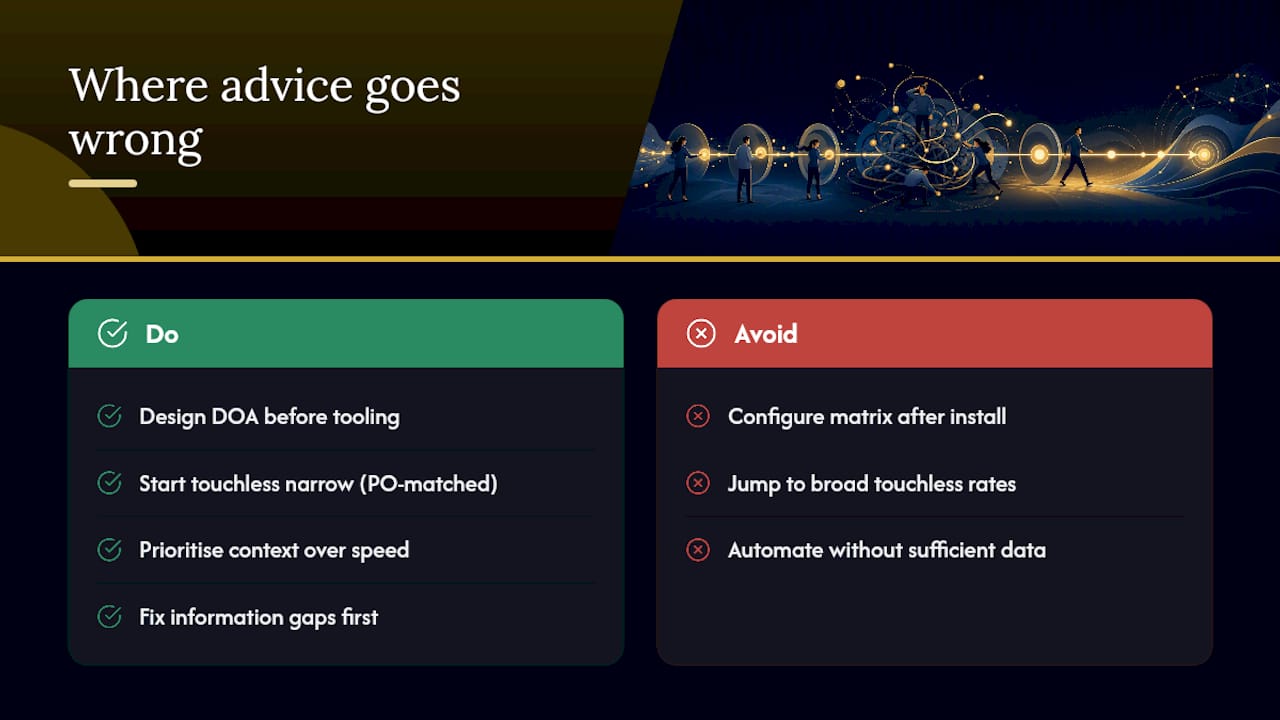
The other blind spot is treating touchless processing as a finish line rather than a graduated target. Teams that try to jump straight to high touchless rates on unmatched or loosely toleranced invoices end up automating their way into new errors, not fewer. Start narrow, with tight tolerances on PO-matched invoices only, and widen scope as the exception rate proves the rules are sound.
What the evidence actually supports is prioritising context over speed. An approver who can see the job, the PO, and the compliance record makes a faster, better decision than one working from a lone PDF attachment, no matter how quick the routing engine is. Fix the information gap first. The cycle-time gains follow naturally once approvers stop having to chase answers.
— Luke Herridge
A connected way to run invoice approvals for service businesses
Curcle is built for exactly the operational mess that stalls most invoice workflows: jobs, purchase orders, compliance records and invoices sitting in separate systems that force approvers to chase context by hand. Where a standalone AP tool only sees the invoice, Curcle links it to the job it came from, the engineer who raised it, and the compliance record it touches, so approvers get the full picture in one place instead of five.

That matters most for engineering, maintenance and compliance-led businesses, where an invoice for parts or a callout is meaningless without knowing which job, asset or certificate it relates to. Curcle brings scheduling, invoicing, stock and compliance tracking into a single connected platform, with role-based dashboards and an audit trail that holds up to scrutiny from managers and auditors alike.
If you're weighing up whether your current setup can support a proper approval matrix and touchless processing, take the product tour and see how the pieces connect before you commit to anything.
Sources
- Invoice Approval Workflows: How to Design Routing That Stops Stuck Invoices | Corpay
- Supplier invoice approval workflow: 2026 design | ininvoice
- What is an invoice approval workflow in accounts payable? - Stampli
- Best practices: invoice-to-pay process automation | Forrester