

Field service dispatch is the process of getting the right technician, with the right skills and the right paperwork, to the right job at the right time. Get it wrong and everything downstream suffers: response times, first-time fix rates, engineer utilisation. Get it right and the single number to watch first is first-time fix rate, because it exposes failures in scheduling, information capture and technician matching all at once.
TL;DR:
- Proper dispatching relies on features like a toggleable schedule board with multiple views, offline mobile app functionality, and automatic certification matching to prevent errors.
- Key KPIs such as response time, first-time fix rate, and engineer utilization improve significantly only when dispatching decisions are data-driven and automation-enhanced.
- Common dispatch failures stem from inefficient routing, incomplete job data, overloading schedules, and poor visibility into SLA risks, which can be remedied with better tools and processes.
- Implementing a new dispatch system effectively requires pilot testing, data cleaning, layered training, and continuous monitoring rather than rushing full regional rollouts.
- Secure data handling, including encryption and audit trails, is essential for protecting sensitive customer and engineer information, especially when integrating with other operational systems.
Table of Contents
- What does field service dispatch actually involve?
- Which features separate a modern dispatch system from a basic one?
- What KPIs actually improve when dispatch works well?
- Why do dispatch processes break down, and how do you fix them?
- How do you choose or improve a dispatch process without wasting a year on it?
- What does research say about schedule board design and dispatch algorithms?
- How long does implementation actually take, and what does training involve?
- What do real-world outcomes from better dispatch look like?
- How secure is customer and engineer data in a dispatch system?
- Author perspective: priority actions for operations leaders
- How Curcle brings dispatch, compliance and scheduling into one system
- Sources
What does field service dispatch actually involve?
Dispatch is not one action. It is a chain of decisions that starts long before an engineer gets in the van and does not finish until the paperwork is filed.
The flow generally runs like this:
- Intake: a job request arrives, by phone, portal, or automatically from a maintenance contract or sensor alert.
- Triage: someone decides urgency, category, and which skills or certifications the job demands.
- Eligibility checks: does an available engineer hold the right qualification (Gas Safe, F-Gas, LOLER, EICR) and carry the right parts or test kit?
- Assignment: the job is placed with a specific engineer, at a specific time.
- Communication: the customer gets a confirmation and window; the engineer gets the job pack.
- En route: live tracking, ETA updates, and any last-minute reprioritisation.
- Completion and capture: signatures, certificates, photos, parts used, and invoicing data.
Three roles run this loop. Dispatchers handle the moment-to-moment reassignments. Planners look further ahead, balancing contracts and preventive maintenance schedules. Engineers execute and feed information back. Within field service management as a whole, dispatch is the operational engine room. Everything else, quoting, invoicing, asset history, only works well if dispatch is feeding it accurate, timely data.
Which features separate a modern dispatch system from a basic one?
A spreadsheet can technically "dispatch" a job. It just does it badly, slowly, and with no memory of what went wrong last time. The features below are what actually move the needle.
- A visual schedule board with multiple views. Dispatchers need a Gantt or time view for granular slot management, a list view for resource-level detail, and a map view for spatial sense. Microsoft's own dispatch board guidance recommends letting users toggle between all three, because a dispatcher managing forty engineers needs a different lens than a planner mapping a rural route.
- A mobile app that works offline. Signal drops in basements, rural sites and steel-framed buildings. An app that can't capture a signature or a gas safety certificate without signal is a liability, not a convenience.
- Skills and certification matching. The system should refuse, or at least flag, an assignment where the engineer lacks the qualification the job needs.
- Asset-aware scheduling. Jobs tied to a specific boiler, lift or fire panel should pull that asset's service history automatically.
- Live GPS, route optimisation and ETA calculation. This is what turns "somewhere between 9 and 5" into a workable customer window.
- Automation aids: suggested assignments based on proximity and skill, batching rules for nearby jobs, and exception alerts when something's about to breach SLA.
Pro Tip: Test any dispatch software by deliberately switching your phone to airplane mode mid-job. If the app can't let an engineer complete and sync a compliance certificate offline, it will fail exactly when you need it most, on a rural site with no signal.
What KPIs actually improve when dispatch works well?
The purpose of investing in better dispatch isn't the software itself. It's the metrics that shift once assignment stops being guesswork.
The core set worth tracking:
- Response time: how long between job logged and engineer on site.
- On-time arrival rate: whether the promised window was honoured.
- First-time fix rate: the percentage of jobs closed without a return visit.
- Utilisation: the proportion of an engineer's paid hours spent on billable work versus travel or idle time.
- Travel time per job and cost per job, which together reveal whether routing logic is actually efficient.
First-time fix is the KPI that best predicts customer satisfaction, because every repeat visit compounds cost, delay and frustration simultaneously. A missed fix doesn't just cost the second callout, it costs the trust built during the first one.
Industry guidance on field service dispatching consistently links automation and improved visibility to faster response and fewer repeat visits, which is exactly what shows up in these numbers once dispatch decisions stop relying on memory and guesswork.
Why do dispatch processes break down, and how do you fix them?
Most dispatch problems trace back to one of four recurring failures, each with a fairly direct operational fix.
- Nearest-neighbour assignment wastes travel. Sending "whoever's closest to the office" rather than whoever's closest by marginal cost to their current route often means engineers criss-cross a region unnecessarily. Marginal-cost logic, assigning based on the smallest addition to an engineer's existing route, tends to cut this waste without adding headcount.
- Incomplete job data causes wrong-first-visit assignments. If intake doesn't capture asset type, access notes and urgency consistently, dispatchers assign blind. Standardised intake fields fix this at the source.
- Overtime and rescheduling spiral out of control. Without finite-capacity scheduling, planners keep stacking jobs onto engineers who are already full, then scramble at 4pm. Capping visible capacity per engineer per day prevents this.
- Poor visibility hides problems until they're customer complaints. Exception dashboards and a live schedule board surface at-risk jobs, ones approaching SLA breach, before the customer has to call and ask where the engineer is.
Pro Tip: If your dispatchers can't tell you, in under ten seconds, which jobs are at risk of missing SLA today, your schedule board isn't doing its job. Fix visibility before you fix anything else.
How do you choose or improve a dispatch process without wasting a year on it?
Start with a short decision framework rather than a long feature list. Six things matter more than the rest: capability fit for your trade, integration with what you already run, compliance handling, mobile usability, routing intelligence, and the quality of support you'll get once you're live.
When you're evaluating a new system, or auditing your current one, ask these questions directly:
- How does data migrate from our existing system, and who owns that process?
- Which accounting, payments, or vehicle-tracking tools does this integrate with natively?
- What's the actual SLA on support response, not the marketing claim?
- What does dispatcher and engineer training look like, and how long until the team is self-sufficient?
- Can the schedule board show conflicts and certification mismatches before an assignment is confirmed?
Certain gaps should stop you signing anything:
- No offline mobile capability. If the app dies without signal, so does your compliance capture.
- No audit trail. If you can't reconstruct who assigned what and when, you can't defend a dispute or an inspection.
- No routing optimisation. A board that just lists jobs without spatial or time logic pushes all the thinking back onto a dispatcher's memory.
- No visibility into engineer certifications on the board itself. This is how compliance breaches happen quietly.
What does research say about schedule board design and dispatch algorithms?
Academic and vendor guidance both converge on the same principle: match the view to the task, and don't rely on the simplest possible assignment rule just because it's easy to code.
Microsoft's own scheduling documentation is explicit that a schedule board needs Gantt/time, list, and map views available and toggleable, because dispatchers, planners and field-facing users all read the same information differently. A dispatcher juggling forty live jobs wants the list view's density; a planner mapping a rural circuit wants the map.
On the algorithm side, recent logistics research on metropolitan, time-windowed delivery and service problems found that dynamic dispatch heuristics and two-echelon routing reduced average operational costs, with combinatorial assignment approaches cutting costs by around 22% on average across experimental scenarios. That's a meaningful gap between blind nearest-neighbour assignment and marginal-cost logic that actually accounts for an engineer's existing route.
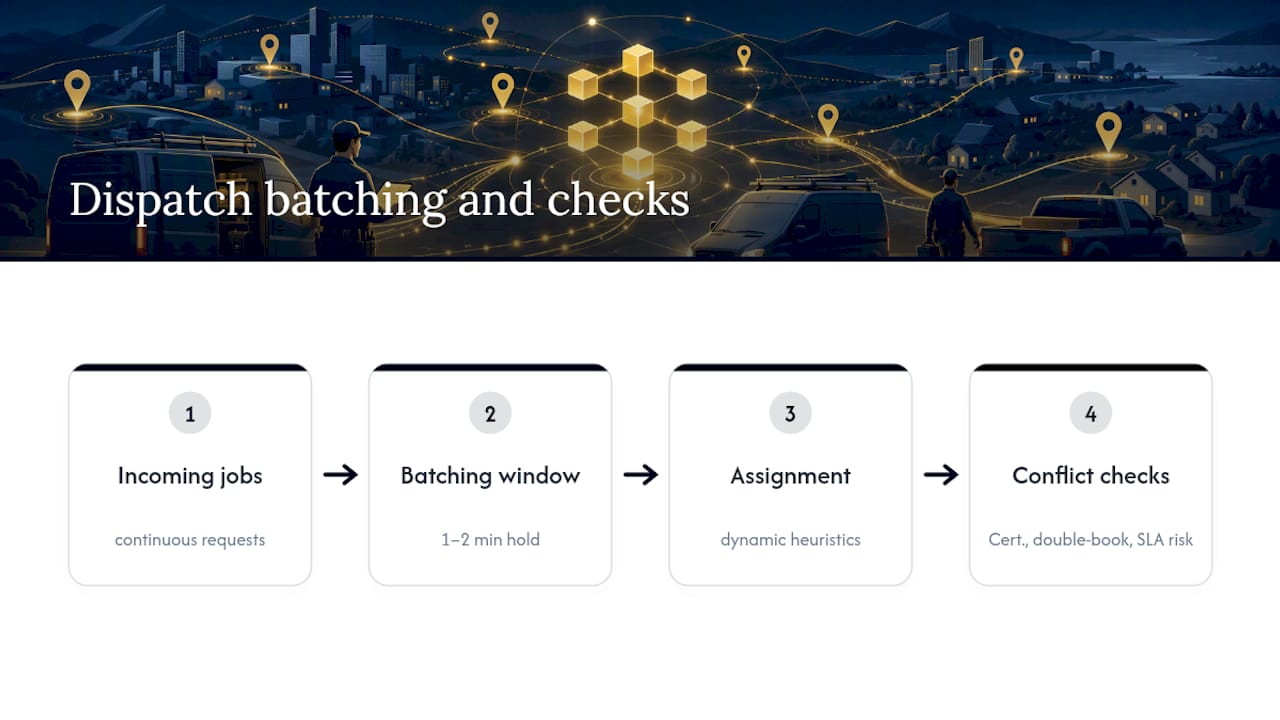
Practical implementations echo this. Batching incoming jobs for a short window, often a minute or two, before assigning them can create bundling opportunities that reduce total travel and cut the number of active engineers needed for the same workload. A well-designed board should also surface conflicts automatically: certification mismatches, double-bookings, and jobs at risk of breaching SLA, rather than leaving a dispatcher to spot them manually.
How long does implementation actually take, and what does training involve?
Realistic rollouts don't try to switch every region over on day one. The sequence that tends to work:
- Pilot with one team or region first. Measure response time, first-time fix and utilisation against your baseline before expanding.
- Clean your data before go-live. Customer records, asset registers and engineer certifications need to be accurate, not migrated as-is with known gaps.
- Train in layers. Dispatcher workflows first, then the mobile app for engineers, then exception handling for whoever manages escalations.
- Monitor adoption weekly for the first month. If engineers are reverting to phone calls instead of the app, that's a training gap, not a technology failure.
Structured field service workflow design tends to produce a smoother pilot than an all-at-once rollout, largely because it exposes data and process gaps on a small scale before they become expensive at full scale.
What do real-world outcomes from better dispatch look like?
Businesses that move from manual or spreadsheet-based dispatch to a structured schedule board typically report faster response times, better first-time fix rates, and, critically, better compliance capture, because certificates and photos get attached to the job at the point of completion rather than chased up afterwards.
The most common rollout lesson isn't technical. Dispatchers often resist a new board initially but then find it indispensable once they can see the whole day clearly instead of guessing at it.
Common threads from businesses that get this right:
- Compliance documents (Gas Safe, EICR, LOLER) get captured on-site, not reconstructed later from memory.
- Engineers spend less time calling the office to confirm the next job.
- Managers stop discovering SLA breaches from customer complaints instead of the schedule board itself.
How secure is customer and engineer data in a dispatch system?
Dispatch systems handle a surprising amount of sensitive material: customer addresses, access codes, engineer schedules, and compliance certificates that often double as legal records. That combination makes data handling a genuine operational risk, not a background IT concern.
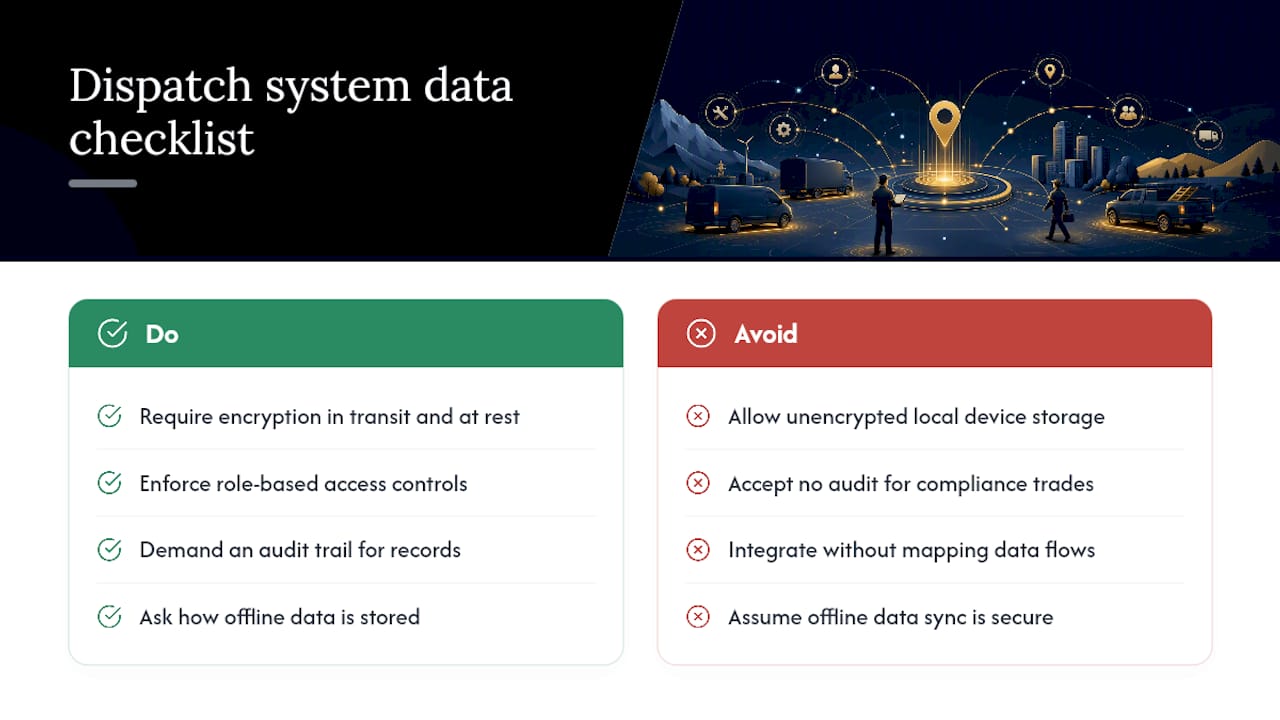
The baseline expectations worth checking before you commit to any system: data encrypted both in transit and at rest, role-based access so office staff and engineers only see what their job requires, and an audit trail that logs who accessed or changed a job record and when. For compliance-heavy trades, that audit trail isn't optional. If a certificate is ever disputed, whether by a landlord, an insurer, or a regulator, you need to show exactly who captured it, on what device, and when.
Offline mobile capability adds its own wrinkle. Data captured without signal needs to sync securely once connectivity returns, not sit unencrypted on a device until it does. Ask any provider directly how offline data is stored locally and what happens to it if a device is lost.
Integration points, accounting software, payment processors, vehicle trackers, identity providers, are also worth scrutinising individually. Each connection is a potential access point, and a system that integrates broadly should be able to show you exactly what data crosses each of those links and why.
Author perspective: priority actions for operations leaders
If you do one thing this quarter, get office and field teams looking at the same schedule board, not two separate versions of the truth. Most dispatch failures I've seen traced back to that gap, not to bad engineers or bad customers. Fix the shared view first; the KPIs follow.
— Luke Herridge
How Curcle brings dispatch, compliance and scheduling into one system
Curcle is built around the exact checklist this article walks through: a schedule board with the view flexibility dispatchers actually need, a mobile app that keeps working when a site has no signal, and compliance capture, Gas Safe, EICR, LOLER, F-Gas, built into the job itself rather than bolted on afterwards.

For compliance-led and multi-site trades, that combination matters more than a longer feature list. A schedule board that flags a certification mismatch before you assign the job saves a wasted callout. An engineer app that captures a signed certificate offline, on a rural site with no signal, saves the argument that follows when a customer disputes it months later. Curcle connects that scheduling layer with invoicing, stock, and asset registers, so the same job record that dispatches an engineer also feeds your compliance reporting without double entry.
If you're evaluating whether your current dispatch process holds up against the criteria above, the practical next step is to see it running against a real job list rather than a slide deck. You can book a walkthrough of the field service platform or look through the full feature set first if you'd rather compare capabilities before booking anything.
Sources
- Use the schedule board (Microsoft Dynamics 365)
- End-to-end logistics in metropolitan areas: a stochastic dynamic order-assignment and dispatching problem
- What Is Field Service Dispatching? (NetSuite)